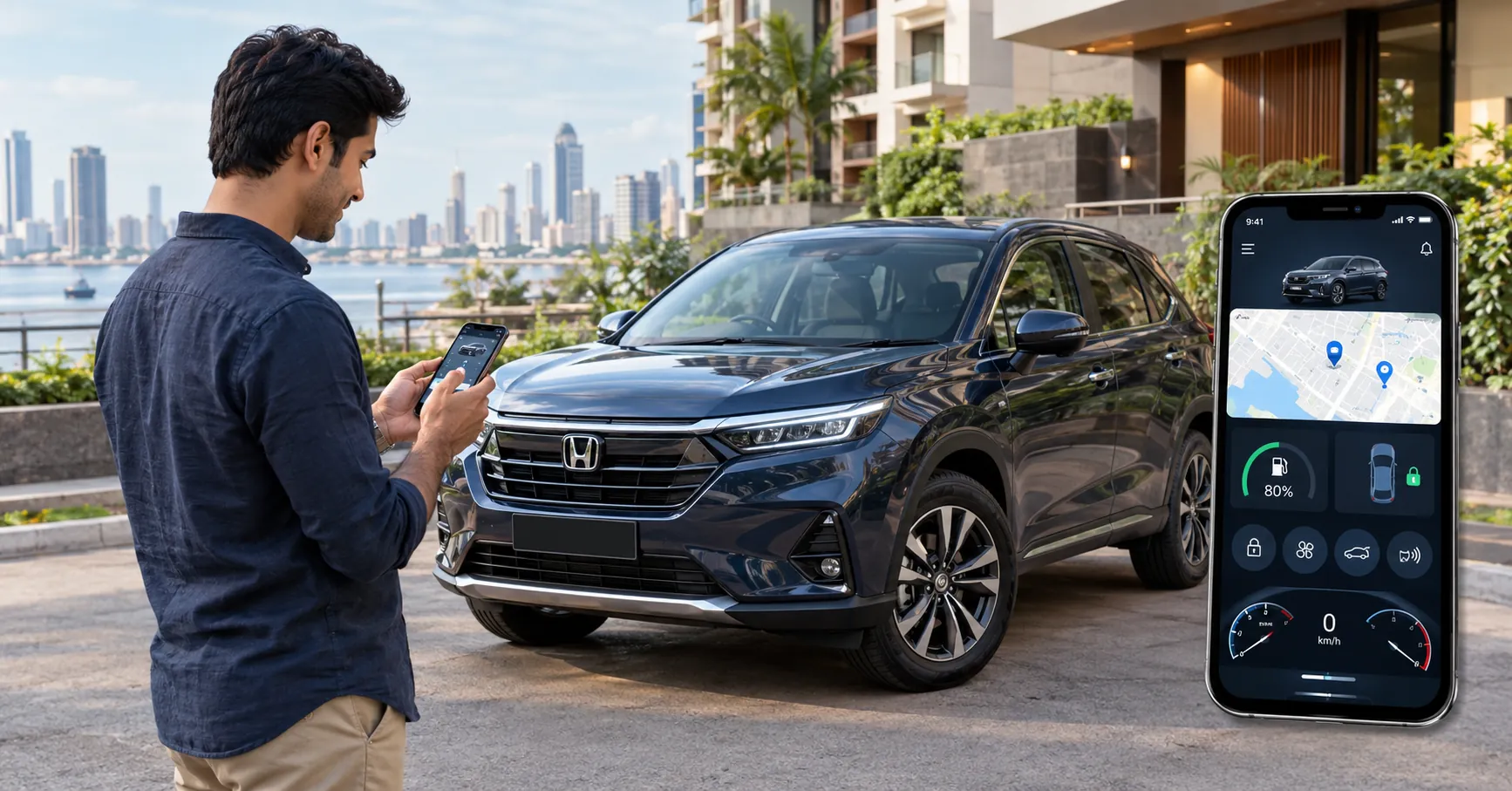
You park in a mall basement in Lower Parel, wander off for two hours, and come back to forty rows of cars that all look the same. Somewhere in there is yours. This is the slightly ridiculous moment where the Honda Connect app earns its spot on your phone. One tap. The horn beeps, the lights blink, and you’re walking in the right direction.
Finding your car is only a small part of it, though. The honda connect app links your phone to your Honda through a module fitted inside the car, and once that link is live, a lot of everyday worry gets quieter. Here’s what it does, how to set it up, and which cars actually support it.
What Is Honda Connect and How Does It Work?
Honda Connect is Honda’s connected-car platform. On supported variants, the car comes with a factory-fitted Telematics Control Unit (TCU), which is a small module with its own network connection. It sends information like location, door status and alerts to Honda’s servers, and the app on your phone picks it up from there.
So the app isn’t talking to your car over Bluetooth. Both ends work over mobile data. That’s why remote features work even when you’re nowhere near the car, and also why they need decent network coverage wherever the car is parked. A car three levels underground with no signal won’t respond until it’s back in range.
Honda says Next Gen Honda Connect offers over 37 features, grouped into safety, convenience and peace of mind.
What Can You Do With the Honda Connect App?
The full list is long. These are the honda connect features most owners end up using week after week.
Safety and Security
- Live car location: See where the car is at any time, which helps when someone else in the family has taken it out.
- Stolen vehicle tracking: If the car is stolen, tracking can be switched on from the app’s help menu or through Honda’s call centre.
- Geo-fence alert: Mark a boundary on the map and get an alert when the car enters or leaves it.
- Auto crash notification: If the airbags deploy, the call centre places a call to you and your emergency contacts get an SMS.
- Unauthorised access alert: Your phone sounds an alarm if someone gets into the car without permission.
Convenience
- Remote AC: Switch the AC on before you reach the car. Honda notes this works on CVT models only, and it runs for 10 minutes unless you extend it.
- Remote lock, unlock and boot open: Useful when a family member needs something from the car and you’re upstairs.
- Find my car: Honk the horn or flash the lights from the app.
- Car dashboard: Check door locks, windows, fuel level and the odometer without walking down.
Peace of Mind
There’s a tyre deflation alert, a roadside assistance shortcut in the help menu, and a driving score that flags harsh braking and hard acceleration. A trip diary logs your drives too. On applicable variants, the car also works with Alexa voice commands and supported smartwatches for basic remote operations.
How Do You Set Up Honda Connect on Your Phone?
It takes a few minutes, and most of it can be done at delivery.
- Download the app: Honda Connect is available on Android and iOS.
- Register your number: The phone number registered against the car becomes the primary owner’s account.
- Set an mPIN: You’ll enter it the first time you use a remote operation. The session then stays active for 10 minutes.
- Link the car: For factory-fitted cars, the dealership usually completes this at delivery. If your car has a dealer-fitted honda connect device, Honda’s FAQ points you to My Honda, then Device, then Enter device details.
- Add family members: The primary owner can add secondary owners and give them full or partial access.
Bought a used Honda? If it came through an authorised Honda dealer, the number is usually updated for you. From a local seller, you’ll need to take the Registration Certificate to an authorised dealer. Any free subscription left on the car moves to the new owner once the records are updated.
Our advice is simple. Ask for the app to be set up and tested before you drive out of the Honda car showroom Mumbai. It’s much easier with someone walking you through it.
Also Read: What to Check Before Taking Delivery of Your New Honda Car?
What Is the Honda Connect Subscription Price?
On applicable variants, Honda includes connected-car telematics services for the first three years with a new car. After that, it moves to a paid renewal.
As per Honda Cars India’s Honda Connect FAQs, the honda connect subscription price is ₹1,749 for one year and ₹3,249 for two years. You renew inside the app using a card, net banking or UPI, and reminders start showing up about 30 days before expiry. Honda also mentions that offers may apply at the time of payment.
Let it lapse and the app doesn’t go dead. Service and CRM features keep working. Only the telematics side pauses, and Honda allows you to renew even after expiry.
One note for owners of older cars with the dealer-fitted Minda i-Connect accessory. Honda states that renewals for that service were discontinued on 30 September 2026. Existing subscriptions stay active until their validity ends.
Is Honda Connect Worth It for Daily Driving in Mumbai?
For most city owners, yes. Especially in the first three years, when the core telematics features come included.
Think about how the car spends a normal Mumbai day. It sits in a society compound or an office basement for hours, sometimes boxed in by another car, and it’s often driven by a driver or someone else at home. Live location, geo-fence alerts and the unauthorised access alert are built for exactly that. And in May, cooling down a CVT car that’s been baking in an open lot in Andheri? You stop questioning that one very quickly.
Where it matters less is if the car only ever sits in a locked garage and you’re the only one who drives it. You’ll use fewer features. Crash notification and quick roadside assistance access are still worth having switched on.
Which Honda Cars Support Honda Connect?
Next Gen Honda Connect with TCU is factory-fitted on select variants of the Honda cars available at Viva Honda. Based on Honda Cars India’s current specification sheets:
| Model |
Variants with Honda Connect |
Variants without |
| Honda City (petrol) |
V, ZX, ZX+ |
SV |
| Honda City e:HEV |
ZX+ |
Not applicable |
| Honda Elevate |
V, VX, ZX, ZX+, ZX+ Black |
SV |
| Honda Amaze |
VX, ZX |
V |
On the Amaze, connected features start from the VX, so if they’re a must-have, compare the honda amaze price in india across variants before you decide. The honda amaze 2nd gen price is lower, but its official specification sheet doesn’t list factory-fitted Honda Connect, so check the options for that model with the dealer.
Frequently Asked Questions
Is the Honda Connect app free?
The app is free to download. On applicable new cars, telematics services are included for the first three years. After that, you renew on a paid plan.
Does Honda Connect work without mobile network?
No. The car’s telematics unit and your phone both need mobile network coverage. Remote commands may not reach a car parked somewhere with no signal.
Does remote AC work on manual Honda cars?
No. Honda states that remote AC operation works on CVT models only.
Can more than one person use the app for the same car?
Yes. The primary owner can add secondary owners, choose full or partial access, and take that access back at any time.
If you’re picking up a Honda this season and want connected features from day one, choose a supported variant and ask for setup at delivery. Drop by your nearest Honda car showroom Mumbai to see the app working on a demo car before you book.